
NC File Default Path Set to Old Version

We recently migrated from a machine running V37 to a new computer with a fresh V38 install. Since the migration, I’ve had to manually update the NC file path in Current Settings each time, changing it from the old V37 directory to the V38 one. Otherwise, posting fails because the V37 path doesn’t exist on the new system.

I may be overlooking something, but the updated path does not seem to persist after restarting BobCAD. Is there a way to make this change permanent?
Hey Joseph! Welcome to the Forum.

There are two places this can be changed, one is the default and the other is per job.

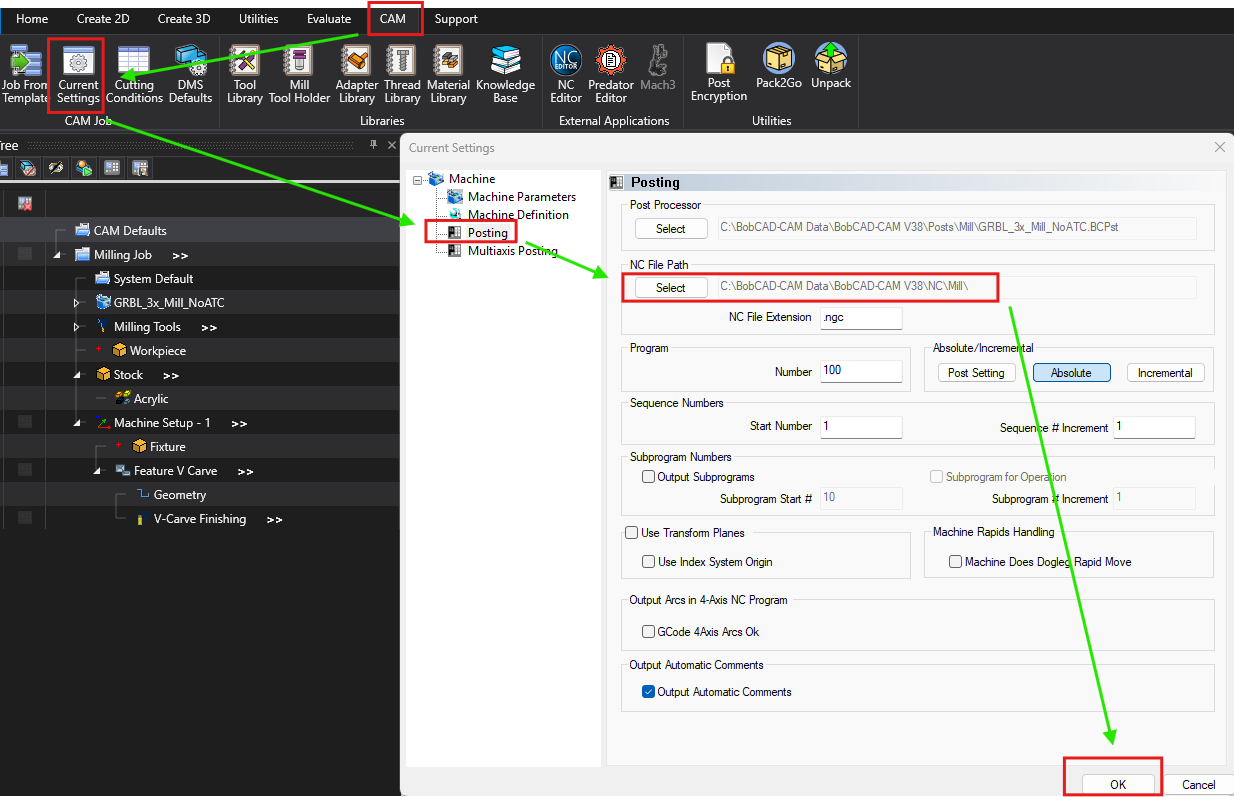
To get this change permanent, go to the CAM Tab at the top of the screen, and select “Current Settings”. This is where you can access the default settings for any job moving forward.

Select “Posting”, then NC File Path, and basically do the same thing you did originally. Once the file path is set to V38, be sure to click OK at the bottom right.

The other way would be accessing current settings through the CAM Tree, by right clicking Milling Job and selecting current settings. going this way only holds the changes for the CURRENT job and will not keep the settings going forward.

Let me know if that makes sense!